POS PIN — no browser save / autofill STAGING
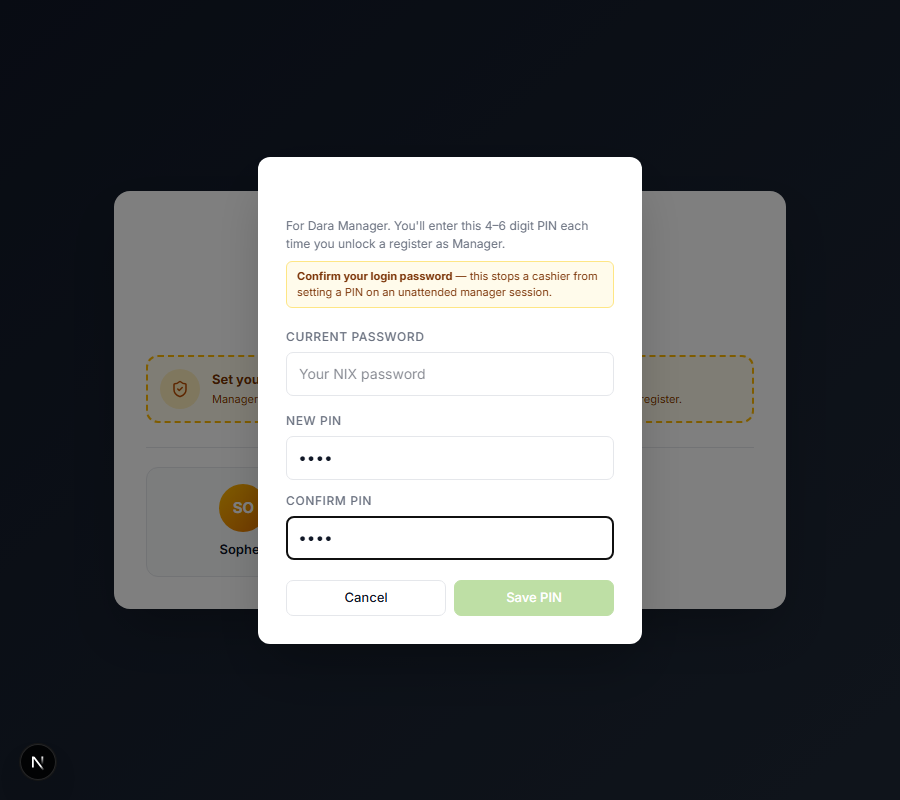
Narong (board item f7): "Don't prompt the browser to save the PIN — autocomplete off on the PIN
inputs." The Set-PIN dialog's PIN fields were type="password", which is exactly what makes Chrome
pop the "Save password?" bubble and autofill them.
The fix: the "New PIN" + "Confirm PIN" fields are now masked text, not password
fields (
-webkit-text-security: disc keeps the dots on the Chromium POS), with autoComplete="off"
+ data-1p-ignore / data-lpignore. Chrome's save bubble only ever fires for
type="password" fields — removing that type is the actual mechanism. The add-cashier PIN gets the same
autoComplete="off". The legit "Current password" confirmation field is untouched. The POS unlock
keypad already uses on-screen buttons (no input), so there was never a prompt there.
Verified (rendered DOM + mask)
pin input attrs: {"type":"text","autocomplete":"off","lpignore":"true","onep":true,"textSecurity":"disc"}
remaining type=password fields in dialog: ["pos-set-pin-password"] (the legit login-password field)
F7 OK — PIN field is masked text, not a saveable password
remaining type=password fields in dialog: ["pos-set-pin-password"] (the legit login-password field)
F7 OK — PIN field is masked text, not a saveable password
nix-cafe 32f554f (nix-cafe-staging Worker). Parked on staging for the scheduled prod promote.